Once workflow tracks have been created, you can add a sequence of stages that submitted forms and documents must follow. Stages can be used to trigger emails, execute stored procedures, evaluate rules, and take action based on data. Use the following stage options to set up your workflows:
Approvers: individuals responsible for reviewing and signing off on a document/form
o Approvers can be granted permission to edit and reroute documents
o Approvers can be set up as primary/required approvers, alternate approvers, or just as reviewers
o Number of approvals required before the document moves to the next stage is configurable
Emails: templates you can tailor and automate to send when certain events occur
Procedures: SQL procedures you can execute when certain events occur
Rules: custom conditions you can define to mandate when and how things move through the workflow

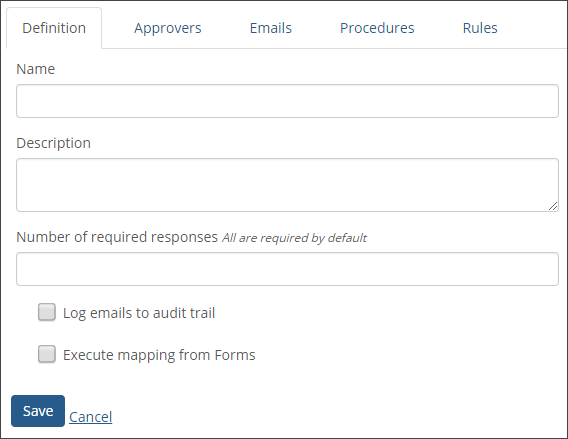
Name - The name of the stage. This name is available to Workflow administrators and to approvers when they review the documents.
Definition - Enter a description of the stage in this field (optional). This description will only be available to Workflow administrators and is only visible when performing administrative functions.
Number of Required Responses - Enter in the number of required responses/approvals for each form submitted to the track that passes through this stage. If this field is left blank, a response will be required from each assigned approver by default.
Log Emails to Audit Trail - Can be used to log emails sent by the Workflow feature. For each scheduled email sent, a new audit row will be automatically created and attached to the form. Any audit information that is stored is displayed at the bottom of a document in the review process.
Execute Statements - Can be used to execute any mapped statements or stored procedures from Forms that were set to execute upon approval. All required approvers in this stage MUST approve the document before the statements are executed.
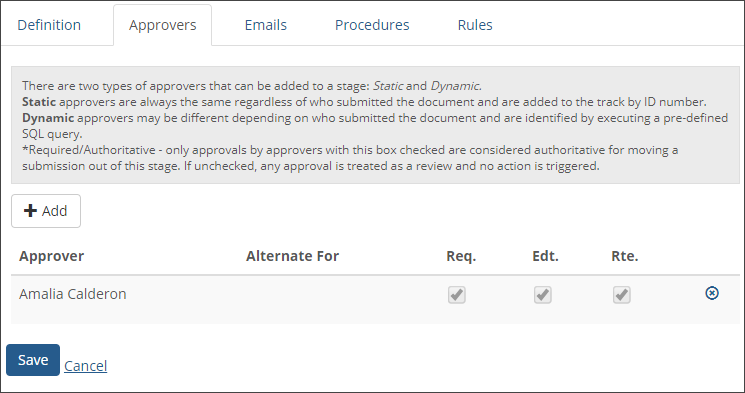
Approvers can be granted permission to review, approve or reject, edit, and reroute a document. They can also add comments and supporting documentation.
Approver Type
Static - Static approvers are always the same regardless of who submitted the document and are added to the track by ID number.
Dynamic - Dynamic approvers may be different depending on who submitted the document and are identified by executing a pre-defined SQL query.
Approver - Begin typing the name of the approver and select from the drop-down list of users that appears.
Can Approve For - This option can be used to give permission to any user to approve on behalf of another approver that has already been added.
Required/Authoritative - Only approvals by approvers with this box checked are considered authoritative for moving a submission out of this stage. If unchecked, any approval is treated as a review and no action is triggered.
Allow Edit - This gives the approver permission to make changes to the data that was in the original Forms submission. All changes to single-response questions will be logged in the audit. Changes to multi-response questions such a checkboxes and collection grids do not currently get logged.
Allow Reroute - This setting indicates that the user can assign the document to a different track during the approval process.

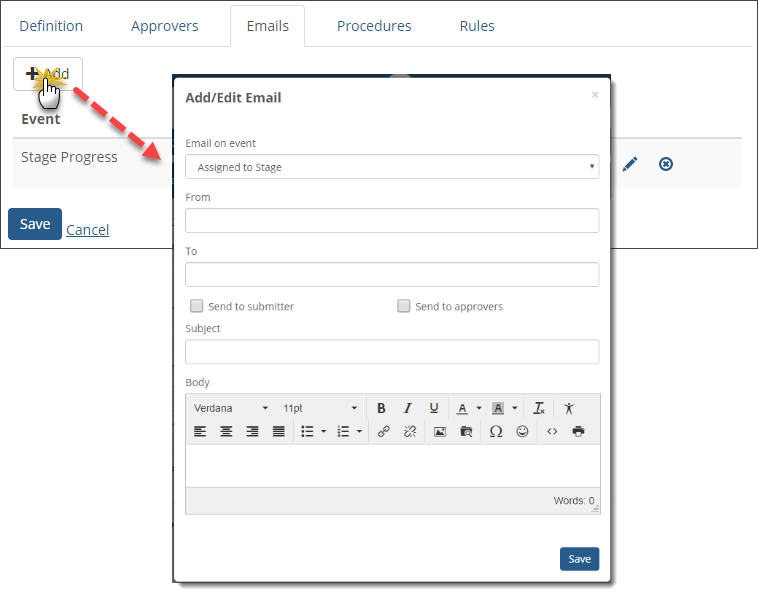
On the Emails tab, the administrator can create email templates that can be automatically sent on certain events.
You can include data point values in the emails being sent by enclosing the tag name in curly braces. For example, the data Point "Check Amount" would be included in the email as "{Check Amount}".
On Event
OnStageProgress - Email sent when all required approvers have approved the submission and the document is moving to the next stage. This event always occurs in the current stage the document is assigned to and executes when the document is in the process of moving to the next stage. For example, you can use this event if you wanted to send an email to all approvers in the stage and say, "Thank you for your response. The document is moving on to the next stage."
OnStageRegress - Email sent when any required approver rejects the submission and the document is moving to the previous stage
OnReRoute - Email sent when the document is assigned to a different track during the approval process
OnAnswerChanged - Email sent when any approver modifies the data from the original submission
OnReturnToSender - Email sent when a required user in the first stage of the track rejects the document
OnAddedtoTrack - Email sent when the document is initially added to the Workflow track
OnRequiredApproval - Email sent any time an approver hits the approve button. This rule may execute multiple times in each stage if there are multiple approvers.
OnAssignedToStage - Email sent immediately when the document is added to a given stage. This can be used to notify approvers that they have just received a document to approve.
Scheduled - An email can be scheduled to be sent after there has been no response for a specified amount of days. This email can also be configured to resend the email after a specified amount of days, and will keep resending the email every X amount of days until there is a response.
Email From - Will be displayed as the sender of the email
Email To - This is an optional setting if using "Send to Approver" or "Send to Submitter". This is a static email address of a user who should receive an email on the selected event.
Send To Approver - The email will be sent to all approvers in the current stage.
Send to Submitter - The email will be sent to the user who originally submitted the document if the Email Address was passed using Event Rules in Forms.
Subject - The subject of the email that is sent
Message - The message of the email that is sent

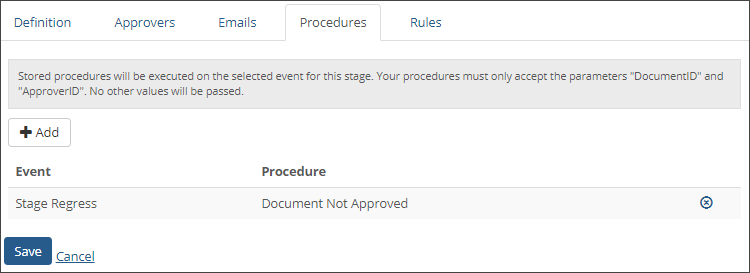
Stored procedures can be used to update data in external databases when a given event takes place in a Workflow stage. Stored procedures will be executed on the selected event for this stage. Your procedures must only accept the parameters "DocumentID" and "ApproverID". No other values will be passed. These procedures are usually used to update supplemental information in your desktop application or your external database. Stored procedures are created in SQL Server.
Name - the name of the stored procedure
Database - the database that will be updated when the event takes place
Event:
OnStageProgress - Procedure executes when all required approvers have approved the submission on that stage. This event always occurs in the current stage the document is assigned to and executes when the document is in the process of moving to the next stage.
OnStageRegress - Procedure executes when any required approver rejects the submission and the document is moving to the previous stage
OnReRoute - Procedure executes when the document is assigned to a different track during the approval process
OnAnswerChanged - Procedure executes when any approver modifies the data from the original submission
OnReturnToSender - Procedure executes when a required user in the first stage of the track rejects the document
OnAddedToTrack - Procedure executes when the document is initially added to the track
OnRequiredApproval - Procedure executes any time an approver hits the approve button. This rule may execute multiple times in each stage if there are multiple approvers.
OnAssignedToStage - Procedure executes immediately when the document is added to a given stage. This can be used to notify approvers that they have just received a document to approve.

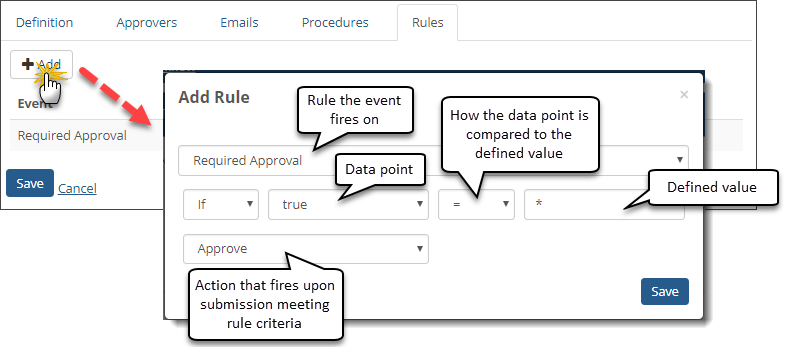
Rules can be used to automatically execute an event, such as adding a comment to the document or approving and progressing the document, if the configured data points meet the specified criteria.
Select the event on which the rule executes:
OnStageProgress - Rule executes when all required approvers have approved the submission on that stage. This event always occurs in the current stage the document is assigned to and executes when the document is in the process of moving to the next stage
OnStageRegress - Rule executes when any required approver rejects the submission and the document is moving to the previous stage
OnReRoute - Rule executes when the document is assigned to a different track during the approval process
OnAnswerChanged - Rule executes when any approver modifies the data from the original submission
OnReturnToSender - Rule executes when a required user in the first stage of the track rejects the document
OnAddedToTrack - Rule executes when the document is initially added to the Workflow track
OnRequiredApproval - Rule executes any time an approver hits the approve button. This rule may execute multiple times in each stage if there are multiple approvers.
OnAssignedToStage - Rule executes when the document is added to the stage. This can be used to notify approvers that they have just received a document to approve.
Select "true" OR select a data point from the drop-down list. Select "true" means that the rule will execute when the event occurs. Any data points that have been added to the Workflow track in Track Settings will appear in this list.
Select how the submitted data point value will be compared to the value defined in the field below. For example, if you want the rule to execute when the submitted data point value is the same as the defined rule value, select "=" from the drop-down.
Enter the value you would like to compare to the submitted data point value. For example, if you want the rule to execute when the data point value is, "Yes", then enter "Yes" into the value field.
Select the action you would like to fire upon the document meeting the criteria defined above:
AddComment - In the field to the right, type in the comment that you would like to add to the document when the rule criteria is met/rule is executed.
Approve - This will automatically approve the document if the rule criteria is met for this stage.
ApproveAndProgress - Approves and progresses the document to the next stage if the rule criteria is met.
DeleteDocument - Deletes the document if the rule criteria is met.
Reject - Rejects the document if the rule criteria is met.
Click Save.
How can I add multiple approvers but only require any one of them to approve the document?
You can add multiple approvers but only require any one approver to approve the document by setting all of the approvers as the Required/Authoritative approver on the Approvers tab. On the Definition tab, set the Number of Required Responses to the number of approvers that are needed for the document to proceed. In this example, you would set the Number of Required Responses to 1.
Can I reroute a form/document to a different track?
Yes, by adding a new rule.
![]() |
Existing rules cannot be updated, but you can create a new rule for rerouting a form/document, and delete the rule you no longer need. |
![]() |
It can be helpful to add a rule to log a comment to the document that lets other users know a condition was met and the form/document was rerouted. |
Click Add. The Add Rule pop-up appears.
Set up the conditions that must be met for the form/document to be rerouted.
From the bottom left drop-down, select Reroute. The track drop-down options appear.
From the Track drop-down select the track you want the form/document to be rerouted to.
Click Save. The Add Rule pop-up closes and the reroute rule is added.
Can I set up the track to skip stages or go back to previous stages?
Yes, by adding a new rule. Workflows aren???t required to be in sequence. You can set up a workflow that goes from Stage 1 to Stage 3 to Stage 5 and then backtrack to Stage 2.
![]() |
Existing rules cannot be updated, but you can create a new rule for rerouting a form/document, and delete the rule you no longer need. |
![]() |
It can be helpful to add a rule to log a comment to the document that lets other users know a condition was met and the form/document was rerouted. |
Click Add. The Add Rule pop-up appears.
Set up the conditions that must be met for the form/document to be rerouted.
From the bottom left drop-down, select Change stage. The stage drop-down options appear.
From the Stage drop-down select the track stage you want the form/document to be sent to.
Click Save. The Add Rule pop-up closes and the rule is added.